I decided to put solar panels on the balcony. I started with one panel connected to an APsystems EZ1-M microinverter, which has two panel inputs. For these tests, I was only using one of them.
The panel supplies DC power, and the inverter converts it to AC for the household electrical system. I wanted to see how much power it was producing through the day, keep a history, and check it from my phone. The panel’s nominal rating only tells me so much about what I’ll get on the balcony. I wanted measurements I could follow over time and use to estimate the energy it produced. That became Solaria.
Getting a connection
I started with AP EasyPower, the manufacturer’s app. Getting a direct Bluetooth connection took a few attempts. Sometimes neither the phone nor a scan from the computer could find the inverter. Later, with daylight and the phone close to it, the app connected. Wi-Fi was still unreliable at the balcony, so I started working on reading the data over Bluetooth.
I also had to check whether the inverter was actually powered. The EZ1 manual says it gets its power from the panel’s DC supply. Having it connected to AC didn’t tell me whether Bluetooth would be available in shade or after dark.
One early read gave me panel voltage, but zero power and zero grid voltage. At that point, only the panel was connected. Once I connected AC, the reads included grid voltage and nonzero power too. So I could read data from the inverter before it was feeding power into the grid. Voltage alone doesn’t tell the whole story: power depends on current too, and a panel can report voltage while supplying little or no power.
Reading measurements with Python
I built a Python CLI and a local FastAPI service, using uv for dependencies.
I started with fixed demo readings so I could work on the API before I had a
working connection to the inverter.
For Bluetooth, I used Bleak for discovery and GATT access. GATT exposes services and characteristics, which give me places to write requests and receive replies. Seeing the inverter in a scan was the first step; I still needed to send a command and get a usable answer back. I used existing EZ1 protocol research to implement the app’s encrypted requests and piece the reply notifications back together. The Python client can read device information and output measurements. It rejects malformed or incomplete replies, and I kept it read-only: it doesn’t send configuration or power-control commands.
uv run solaria bluetooth scan --duration 30
uv run solaria bluetooth output --device EZ1_YOUR_DEVICE_ID
The returned fields include p1 and p2 for power, v1 and v2 for panel
voltage, and gv for grid voltage. I kept the vendor’s field names. I still need
to validate the units on its energy counters, and its clock could start in 1970,
so I use the host’s time for collection timestamps. Keeping the raw fields means
I can revisit how I interpret them later, without having baked a wrong unit or
timestamp into the history.
This worked with the computer close to the inverter and AP EasyPower disconnected. It was enough to develop against, but I didn’t want to leave my computer running there just to collect readings.
Choosing the collector and backend
I considered a home server and using the router. But the collector only needed to read Bluetooth and upload over HTTPS, so I bought a Seeed Studio XIAO ESP32C3. It has BLE, 2.4 GHz Wi-Fi, and USB-C for programming and power. It needs a spot with usable reception for both radios, but it connects to Wi-Fi itself. That takes the inverter’s Wi-Fi connection out of the data path. The work fits on a microcontroller, without needing a general-purpose operating system.
For the backend, I went with a TypeScript/Hono API on Vercel, with PostgreSQL and Auth from Supabase. The React Native app reads through that API. All four parts, including the Python tools, live in one monorepo.
The board keeps collecting locally, the API handles uploads and queries, and PostgreSQL keeps the history between requests. That means I can check earlier readings from my phone even when the inverter is unavailable. SQL also fits the timestamped records, device ownership checks, and hourly aggregation well.
Microinverter -- BLE --> ESP32 -- HTTPS --> Hono API
                                             │
                                        PostgreSQL
                                             │
Phone app <----------- authenticated API -----┘
I gave the collector a per-device upload token. The database stores its hash, and the token only allows uploads. For the mobile app, I use manually approved email/password accounts, with queries scoped to the device owner. Database requests also need a server-only gateway key supplied by the API. That key and any administrator credentials stay off the board and phone.
I’m currently using free plans for the API and database. I record one historical sample per minute, or 1,440 records a day, and reduce older data to hourly summaries. That gives me a useful history without storing every reading from a faster live display. Provider quotas still apply, and I haven’t measured the board’s active power draw or battery runtime yet.
Running the firmware on my computer first
I wrote the collector core in C++17, with interfaces for Bluetooth, cryptography, time, storage, and HTTP. The same code compiles for a desktop executable and the ESP32. On the desktop, Bluetooth goes through a Python/Bleak adapter. On the board, I use ESP-IDF’s NimBLE, Wi-Fi, HTTPS client, and NVS storage. This lets me work on the collection and retry logic on my computer and carry those fixes over to the board.
Before sending a historical reading, the collector saves it to a 32-record
queue. On the board, that lives in NVS, so it survives restarts. Uploads contain
up to eight records, and each reading gets a UUID that stays the same across
retries. The database uses the device and sample ID to deduplicate them. I only
remove a record from the queue after a valid acknowledgement. Failed uploads
back off and honour Retry-After. If the queue fills up, collection pauses, so
a long outage can still leave gaps.
One case I wanted to handle was an upload reaching the database but its acknowledgement getting lost on the way back. The collector needs to retry, but that shouldn’t count as a second measurement. Keeping the same UUID lets the server recognise it.
My desktop tests run the actual collector against the Hono API and an isolated PGlite database. A simulated Bluetooth adapter checks the requests and returns encrypted, fragmented replies. I can test retries, lost acknowledgements, queue recovery, and database writes without waiting for daylight or having the inverter nearby.
Trying it on the ESP32
After flashing and USB provisioning, the board joined Wi-Fi and synchronised its clock. Bluetooth took more work. I increased discovery to 30 seconds, accepted both 16-bit and Bluetooth-base service UUID encodings, and negotiated an ATT MTU of 247 before discovery. The MTU is the maximum ATT packet size the two devices agree to use. The inverter accepted 247, which resolved the incomplete replies I’d been getting with the board’s default.
Then the first HTTPS attempts failed. The readings stayed in the queue while I worked through that. Enabling ESP-IDF’s cross-signed certificate-bundle verification fixed the handshake failure, with hostname, certificate trust, and expiry checks still enabled. The queued readings survived the USB firmware update and were acknowledged by the API afterwards.
At that point, I had readings going all the way from Bluetooth to the database on the board. The desktop tests had helped with the collector logic, but these radio and TLS problems only showed up on the hardware. I still need to test what happens when the board abruptly loses power.
Building and deploying the pieces
With everything in one repo, it’s easy to forget that updating each part works differently:
| Part | Runs on | Update method |
|---|---|---|
| Python tools | Development computer | Source and uv environment |
| Collector | ESP32 | USB firmware flash |
| HTTP API | Vercel | Git deployment |
| Data and Auth | Supabase | SQL migrations and settings |
| Mobile app | Phone | Native app installation |
I’ve connected Vercel to the monorepo with cloud/ as the project root. Pushes
to main deploy the Hono API as a Node.js 24 function. The install command runs
npm ci, TypeScript checking, API tests, and a dependency audit before the build.
The mobile app and firmware have their own builds outside that API deployment.
Supabase hosts PostgreSQL and handles sign-in. I keep the SQL schema, database
functions, permissions, and retention schedule under cloud/supabase/migrations/
and apply those migrations to the hosted project separately. Deploying the API
doesn’t update the database schema. A daily retention job runs inside PostgreSQL
through pg_cron, keeping detailed readings for about 90 days and preserving
older data as hourly summaries.
The API gets its Supabase configuration and gateway secret from Vercel environment variables. I’ve scoped the gateway secret to production, so preview builds need their own database and gateway configuration before they can serve requests. An unfinished API branch doesn’t automatically get access to my production readings.
I build the firmware locally with bash firmware/scripts/build.sh device, using
the pinned ESP-IDF v6.1 toolchain. Then I flash it over USB and provision the
inverter ID, API origin, Wi-Fi credentials, and per-device upload token into NVS.
Those values are runtime configuration, rather than part of the firmware image.
Once configured, the board runs from USB power on its own. I still use USB for
firmware updates; I haven’t added an OTA updater.
I build the app locally too. From mobile/, npm run android produces a Release
APK and can install it on a connected phone. I can also install the APK from a
file. npm run ios builds a Release app for the simulator; installing it on a
physical iPhone requires a signing team. Both builds use Gradle and Xcode through
Expo’s tooling and include the JavaScript bundle. I haven’t set up store
publishing or automatic app distribution yet.
The app build includes the API origin and public Supabase identifiers. The gateway secret and collector credentials stay out of it. If I change the app’s service configuration, I need a new build. For the board’s Wi-Fi settings, I use USB provisioning.
GitHub Actions checks the Python, cloud, mobile, and desktop collector code on pushes and pull requests. It runs tests and dependency audits, including the mobile browser workflows. Vercel handles API deployment through its Git integration. Flashing the ESP32 and installing the app on my phone are still local steps.
Checking the readings on my phone
The React Native app shows the latest power reading, recorded energy, and hourly history. Its Release build runs without Expo Go or Metro. If a reading is stale, I keep its timestamp visible. Missing telemetry stays missing instead of showing up as zero.
Once the collector was working, I wanted faster updates for checking output while at home, so I added a ten-second mode. When the app is watching Live, it renews a 90-second viewer lease. That’s an expiry time the app keeps pushing forward while someone is watching. The board picks it up in its next normal upload acknowledgement and starts sampling faster. If the phone loses its connection or exits without sending a stop request, the lease expires on its own.
For those intermediate readings, I overwrite one database snapshot per device. They don’t go into the history or the NVS queue, because the live display only needs the latest value. Historical storage and NVS writes stay at the minute cadence.
Multiple phones on the same owner’s account can poll that snapshot. Leaving the screen or backgrounding the app stops its renewals, though another viewer can keep the lease active. Once it expires, the board goes back to minute sampling. Starting Live can take until the next normal upload, with network and Bluetooth delays adding some latency.
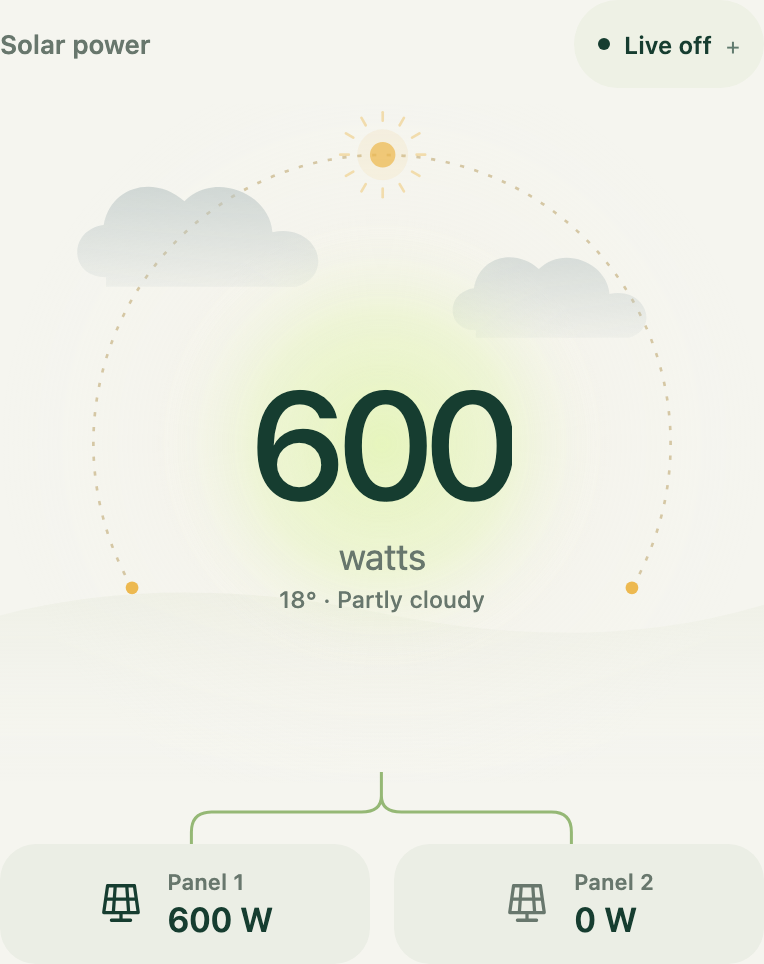
I put the reading alongside a sun path and local sunrise/sunset times. Weather from Open-Meteo is fetched every 15 minutes and changes the clouds and precipitation animation. That weather is modelled separately from anything the inverter measures. The animation shares one coordinate system for the orbit, glow, and number, pauses off-screen, and respects reduced motion. I kept the detailed electrical readings and settings in separate sheets.
Working out the energy and its value
The power reading tells me the rate of generation at that moment, in watts.
To estimate energy in kWh, I need to add up that production over time. I do that
by integrating adjacent historical power readings, using P = p1 + p2. With
power in watts and timestamps in seconds, the calculation is:
energy_kwh = ((P_a + P_b) / 2) * (t_b - t_a) / 3_600_000This assumes power changes linearly between two readings: take their average power and multiply it by the elapsed time. I skip intervals longer than three minutes, because I don’t want to stretch that assumption too far across a gap. The API reports covered time alongside the energy estimate, so I can tell when a day’s estimate only covers part of the day. I don’t extrapolate across the missing periods.
I also added an editable electricity rate to show what that energy would cost to buy. Feed-in payment defaults to zero, and an optional export percentage lets me try an assumed scenario. To work out actual exports or avoided imports, though, I’d need household-meter data. The house can use the generated power as it arrives, and only the surplus is exported. Multiplying generation by the purchase rate gives me an equivalent value; it doesn’t tell me how much I’ve saved on the bill.
I can now check real readings without leaving a computer running by the inverter. There’s still some work left: measuring the board’s power consumption, testing the final enclosure and radio position, and adding meter readings before I can report actual export. For now, I have a way to see what the panel is doing and follow it over time, which is what I wanted when I started.